A customer walks into your repair shop with a broken cell phone, tablet, or computer. You take the device, write down details, search for parts manually, and then struggle a bit at checkout. Meanwhile, another customer is waiting.
Sounds familiar?
Many repair shops still deal with slow systems, payment delays, and inefficient tracking. However, in today’s fast-paced world, that can cost you both time and customers.
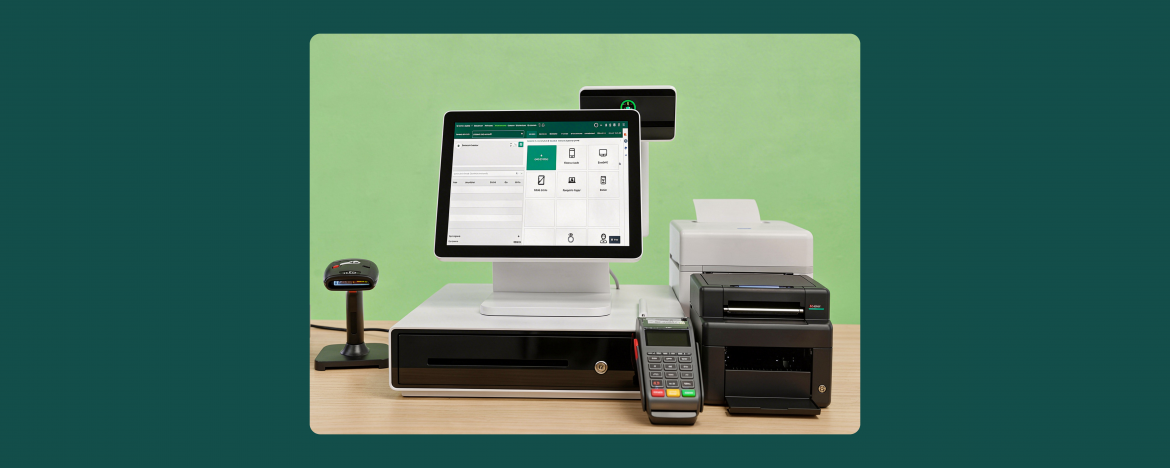
That’s why you need the right POS software along with the right hardware setup.
By having a few smart tools, you can transform your repair store into a fast and organized workspace. From managing repair jobs and inventory to handling payments smoothly, the right setup makes everything easier.
Let’s look at the 5 must-have POS hardware components your repair shop needs to work efficiently and grow faster.
1. POS Terminal (Computer or Tablet)
First things first, a computer screen or tablet is the heart of your POS setup, where everything happens. It runs the software and saves all the information you collect from your customers. For instance, you can use it to:
- Add customer details
- Create repair tickets
- Track job status
- Generate invoices
Modern POS software can also be operated using a tablet screen. It is easy to use, affordable, and does not take much space on your counter. Use your iPad or any Samsung tablet for customer self check-in and get customer signatures on the go.
When you combine your hardware with a smart POS software, you can effortlessly manage the entire workflow in one place.
Why does it matter?
It keeps your work organized and saves time every day.
2. Barcode Scanner
One of the most important POS hardware components for repair shops is the barcode scanner. If you also deal with repair parts and accessories, a barcode scanner can simply read the product barcode and transfer all the information for bill processing.
When you have it, you don’t need to type product details and names manually. Instead, you can just scan items which helps you:
- Quickly track inventory
- Reduce human errors
- Speed up billing
For instance, if your customer needs a screen replacement, you can scan the part and add it to the repair ticket.
In addition, ensure your point of sale software can help you with inventory management. A POS system with low-stock alerts helps repair shops never run out of essential parts and accessories, and notify you in a timely manner whenever you need to reorder products.
Why does it matter?
It makes your inventory management simple and accurate.
3. Thermal Receipt Printer
A thermal receipt printer may seem like a small component, but it plays a crucial role in your repair shop. With a thermal receipt printer, you can quickly print:
- Receipts
- Bills
Offering printed receipts and bills can help you build customer trust, and make you look even more professional.
In addition, you can also use receipts to include:
- Your shop name and contact details
- Terms and conditions
- Warranty or return information
Why does it matter?
It enhances your brand image and keeps records clear.
4. Cash Drawer or Payment Terminal
To grow your business, and manage expenses, one process holds a lot of importance and that is handling payments smoothly.
These days, business owners use two components along with a point of sale system to manage payments. These are:
- Cash drawer
- Payment terminal
The cash drawer is used to hold cash. Whenever a customer pays at the counter, the cashier takes the money and places it in the cash drawer. In the same way, you can also save bank card receipts and transaction-related paperwork in these as well. Ensure to choose the best POS cash drawer that fulfills your requirements.
Then, there are payment terminals, which are getting quite common these days. As customers prefer digital payments, this terminal allows you to accept:
- Bank cards (credit, debit)
- Contactless payments
- Mobile wallets
This way, when your payment process is fast and secure, customers will leave your store with an even better experience.
Why does it matter?
It makes checkout quick, safe, and convenient.
5. Customer Facing Display
Adding a customer facing display to your POS software can be great as it gives a modern touch to your business. You can enhance user experience with customer facing display as it shows:
- Repair details
- Prices
- Total bill
It keeps everything transparent and your customers can see exactly what they are paying for. No extra charging, no confusion. This builds trust and reduces disputes.
Why it does it matter?
It enhances customer experience.
How do these POS Hardware Components Work Together?
Each of these mentioned hardware components plays a vital role. Below is a simple example:
- Customer walks in with a broken or malfunctioning device
- You inspect the gadget and create a repair ticket on your computer or tablet
- Scan the required repair part using a barcode scanner
- Generate the bill after finishing the job
- Accept payment through your terminal
- Print the receipt
This way, every process becomes smooth, quick, and professional.
Common Mistakes to Avoid
Choosing the essential hardware POS components is not enough. You need to pick the right one. Try to avoid:
- Buying cheap hardware that breaks quickly
- Not using a barcode scanner for inventory
- Using tools that don’t connect with each other
So, you must invest in the right setup from the beginning to save time and investment.
Final Words
Running a successful repair shop is more about speed, accuracy, and trust, instead of just fixing devices. If your system is disorganized, it shows, and customers notice that. But when you have the right POS hardware in place, you can make the entire workflow faster, and more professional.
Pair that with a powerful repair shop software and you’re not just managing repairs, you’re running a smart, modern repair business.
Now is a great time to upgrade your shop and stay ahead of the competition.
FAQs
1. What POS Hardware Does my Repair Shop Need?
if you run a repair shop and use POS software, you need hardware components including tablet, barcode scanner, thermal receipt printer, cash drawer or payment terminal, and a customer-facing display. These tools help manage operations and process payments efficiently.
2. Where can I find Recommended POS Hardware for Repair Shops?
If you’re not sure which devices to choose, you can explore our recommended hardware to find reliable tools that fit your business needs.