

A technician starts an iPhone screen replacement. Mid-repair, they look for the parts in the bin only to find it empty.
The customer is waiting.
You are panicking.
The repair job that should have taken 30 minutes now turns into an awkward interaction and a long wait for your customer. If this happens at your repair store, the problem is not with your team but with your inventory management system.
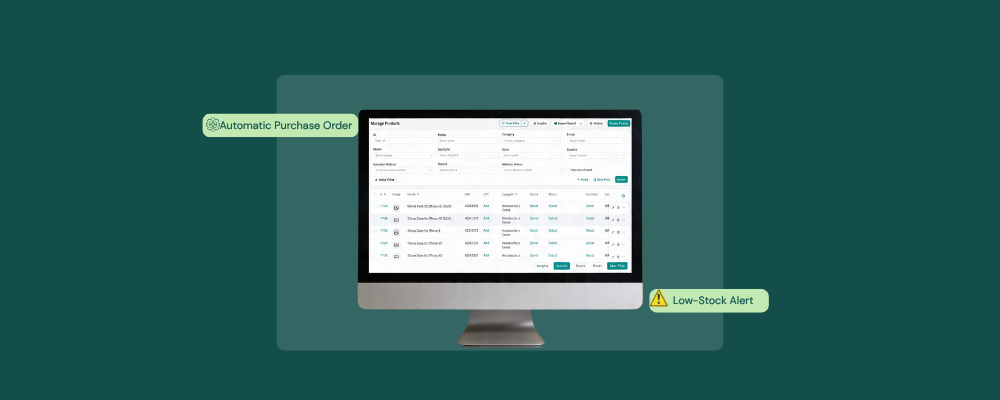
RepairDesk prevents this breakdown from happening using its repair shop inventory management. It connects repair tickets directly to the parts catalog, so each time a part is used, it is automatically updated, triggers a low-stock alert, and generates purchase orders directly with the designated supplier. This ensures that no bench technician ever reaches an empty part bin.
Why Do Repair Shops Struggle with Inventory?
Research cites an annual revenue loss of more than 50% due to inventory management issues. Several phone, computer, and small engine repair shops use disconnected tools. Nothing updates automatically when a technician uses a part. This results in a stock count based on what was initially ordered, not on what was left.
This is how it appears:
- Parts Used without Deduction
A technician uses an iPhone 14s screen on a repair ticket but doesn’t update it. The stock count, which was 5, does not update to 4, leading to a discrepancy that will later cause problems.
- Stockouts discovered during repair
Without a per-SKU cutoff, the technicians or the store owner have no early warning. RepairDesk offers a low-stock alert so that, as soon as the reorder point is reached, the system automatically flags it.
- Purchase orders managed outside the system
Email and memory-based reorder decisions often result in missed, duplicated, or delayed orders.
- Overstocking
Without accurate SKU data, shop owners overorder parts that go unused. This results in tying up cash in low-selling parts.
How RepairDesk Solves the Inventory Issues
RepairDesk connects a parts catalog, repair ticket workflow, purchase order generation, low stock alerts, and multi-store inventory management all within one platform. This practice ensures that stock levels are updated automatically within seconds.
Automatic Parts Deduction on Every Repair Ticket
RepairDesk deducts each part from the parts catalog automatically when a technician uses it after marking the job complete. It logs the part’s SKU, the quantity used, and the updated stock quantity. This maintains accurate stock levels without manual labor.
Low-Stock Alerts
The software offers low-stock alerts as soon as SKUs fall below the set level, automatically triggering notifications. The reorder levels are calculated per SKU using average daily consumption. Having the alerts is an excellent way to prevent the inventory from becoming a disaster.
Purchase Order Generation
RepairDesk sends a purchase order to suppliers immediately when the low-stock alert is triggered. The inventory management software enables the generation of a draft with the required quality and supplier contact information, so the store owner can simply review, approve, and send the PO directly without using email or other applications.
Barcode Scanning for Accurate Intake of Stock
As soon as a purchase order is received, each part’s barcode is scanned upon its intake to update the stock quantity, confirm its SKU, and complete the purchase order when all items are received. Barcode scanning enables manual counting errors and ensures stock is updated accurately.
Bulk Parts Catalog Import
RepairDesk imports the full parts catalog in a single bulk upload. This means it accepts part names, SKUs, stock quantities, prices, suppliers, and reorder details in bulk, allowing the shop owner to manage hundreds of SKUs simultaneously without adding new parts. This feature also helps the store owner to spot inaccurate stock quantities across the entire catalog.
Multi-Store Inventory Management
RepairDesk creates and transfers inventory orders across multiple stores, making managing inventory across stores feasible. You can easily record SKUs, track quantity transferred, locate all completed and pending purchase orders, and maintain visibility across all your stores.
Inventory Labels
The inventory management software generates unique labels and SKUs, making physical shelf organization and digital tracking of parts easy. Technicians can scan the barcodes on labeled parts to pull up SKU records. This allows them to confirm stock quantities without manually typing or searching.
What Repair Shops Gain From Inventory Management Software?
RepairDesks’ shop inventory management system removes three manual steps
- The technician doesn’t log part consumption differently from the repair ticket.
- The repair store owner no longer manually checks stock levels
- The purchase order is automatically processed
This way, the job is completed on time, and the customer doesn’t leave your store unsatisfied.
Key Note
Inventory is a task to handle, but it doesn’t have to be while using RepairDesk. With low-stock alerts, purchase order automation, and serialized inventory tracking, managing inventory across multiple stores is accurate, stress-free, and time-saving.
FAQs
1. How does RepairDesk prevent part stockouts during repairs?
It assigns reorder levels to every SKU in the parts catalog and automatically triggers low-stock alerts when those levels are reached.
2. Can RepairDesk handle multistore inventory?
Yes. It can easily manage transfer orders, recording SKU, quantity, source, and supplier information on a single platform.
3. Does RepairDesk offer any integration with accounting software?
Yes. RepairDesk offers accounting integration with QuickBooks and Xero. You can check out other integrations we offer here.


