
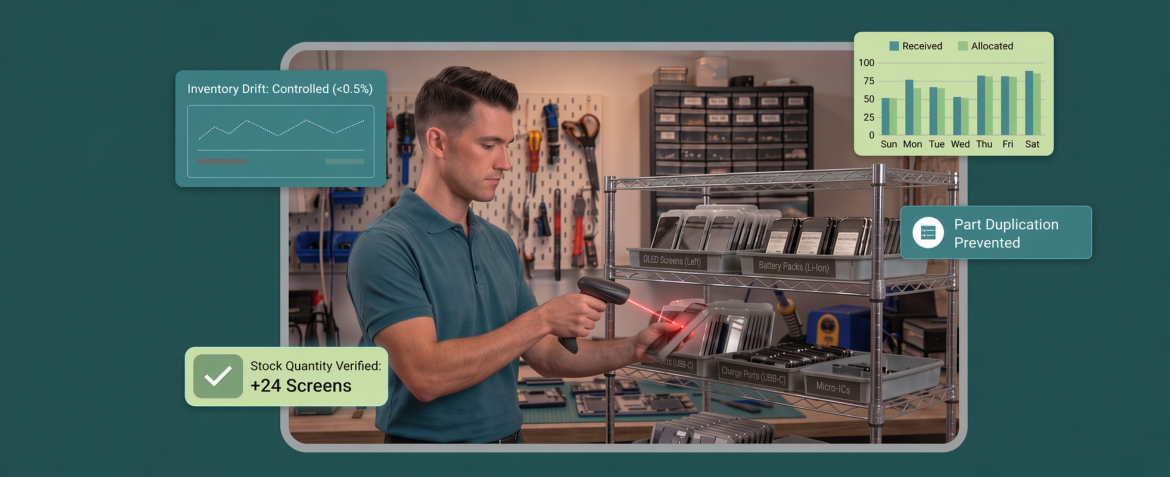
Parts don’t disappear in repair shops. They just move fast. A tech grabs a charging port. A screen gets pulled for a rush job. A return gets tossed back on the shelf. A “we’ll receive it later” box sits near the counter. By the time the day slows down, your numbers are already lying to you.
That’s what makes inventory accuracy tricky. You are not running a quiet warehouse. You are running repairs and retail at the same time, with multiple people touching the same bins and the same SKUs across shifts. Without a consistent process, stock drift shows up as delayed jobs, surprise stockouts, weird margins, and tickets that don’t match what was actually used.
This is where repair shop inventory management software should help you stay sane, but the real win comes from pairing it with a repeatable workflow your team can follow even on the busiest days.
Inventory Accuracy Means Two Things in a Repair Shop
Inventory accuracy isn’t just “the count looks right.” In a repair shop, it has two jobs to do at the same time.
First, your shelf has to match reality. If the system says you have six charging ports, but the bin has two, you don’t just lose a sale. You lose time. Jobs stall, techs improvise, and the front desk starts making promises that depend on parts you can’t find.
Second, the job has to match the shelf movement. Parts don’t move only through retail checkout. They move through repairs, swaps, warranty replacements, and returns. If parts usage isn’t recorded against the right ticket, your inventory can look fine on paper while your profitability and reporting quietly drift.
That’s why repair shop inventory management software works best when it supports both sides. Accurate stock levels and a clean connection between parts used and the work that caused them to move.
Where Inventory Drift Starts in Fast-Moving Shops
Inventory drift usually starts with small shortcuts that feel harmless in the moment. A tech pulls a part to keep a job moving and plans to record it later. Someone receives a shipment but doesn’t finish the full receiving step because the counter gets busy. A return goes back on the shelf without being logged because it looks fine. Each action takes seconds, but the cost shows up later when the system no longer matches what’s actually in your bins.
The second cause is inconsistency across people and shifts. One person creates a new item because they can’t quickly find the existing SKU. Another records the same part under a slightly different name. Someone makes a stock adjustment to fix a mismatch, but doesn’t document why. Over time, you end up with duplicates, unexplained losses, and parts that look available in the system but can’t be located when a repair is on the bench.
The fix isn’t counting more often. It’s updating inventory at the right moments, every single time, so drift can’t build up quietly in the background.
The Four Moments Your Inventory Must Update
Keep inventory accurate by updating it at the same points throughout the day, no matter how busy the shop gets. Miss even one of these moments and the system starts drifting, because parts are already moving while the record is staying still.
These are the four moments that matter most. Start with receiving, because that’s where most errors quietly enter the system.
1) Receiving Inventory Without Creating Errors
Receiving is not just adding stock. It’s confirming that what arrived matches what you expected, and that it lands in the right place under the right item. Most inventory problems begin here because a small mismatch at receiving time turns into a bigger mess later.
A clean receiving habit looks like this:
- Match items against the purchase order or supplier invoice before you add anything to stock
- Confirm the exact model, variant, and condition so you don’t create duplicates
- Log partial deliveries and backorders immediately so you don’t “count” parts you still don’t have
- Put parts into their proper bin locations before the next ticket pulls them off the shelf
When receiving is done properly, everything downstream becomes easier, because the starting numbers are real.
2) Recording Parts Usage on the Ticket
Inventory starts drifting the moment parts leave the shelf without being tied to a specific job. It only takes a few rushed repairs for counts to fall out of sync, because the part is gone physically but still sitting in the system as available.
The clean habit is to record the part at the moment it’s used, while the repair is still in progress. That keeps three things aligned without extra cleanup later. The ticket reflects what was installed, the invoice matches what the customer is paying for, and stock levels update in real time instead of getting patched up at closing time.
In practice, repair shop inventory management software should support that habit by making parts usage easy to attach to the ticket during the workflow, not as a separate end-of-day task.
3) Handling Returns and Warranty Swaps Cleanly
Returns and warranty swaps are where inventory gets quietly distorted. A part comes back and gets tossed into a bin. A warranty replacement goes out, but the original part never gets marked as returned. A “looks unopened” item gets treated as new stock, even though it was handled, tested, or partially used. None of these feels dramatic in the moment, but they add up fast because they create stock that exists on paper, not in reality.
A clean routine keeps returns and swaps from blending into normal inventory. The key is to treat every return like a mini receiving event, with a decision attached to it.
- Log the return immediately and tie it to the original ticket or sale so you can trace why it came back
- Check condition before restocking and use a simple rule such as restock, quarantine for testing, return to vendor, or scrap
- Separate the physical bins so returned parts don’t mix with “ready to use” stock
- Handle warranty swaps as two movements: one part out, one part in, each recorded so counts don’t drift
- Record vendor credits or replacements in the same workflow so your numbers match what actually happened
Done right, repair shop inventory management software becomes a guardrail here, because it helps you track the reason and the movement instead of letting returns disappear into a shelf.
4) Keeping Adjustments Controlled and Traceable
Stock adjustments are often where drift gets locked in permanently. Not because adjustments are bad, but because they’re usually done under pressure. Someone can’t find a part, the system shows it should be there, and the quickest fix is to adjust the quantity so the number “looks right.” That might solve today’s problem, but it hides the real cause, and the same issue repeats next week.
The goal is to make adjustments the last step in a clear chain, not the first reaction.
- Limit who can adjust stock so it’s not a universal shortcut
- Require a reason every time, using a short set of categories like damaged, missing, found, data cleanup, or count correction
- Tie adjustments to an event, such as a cycle count, a return decision, or a receiving mismatch
- Review adjustments weekly, not to micromanage, but to spot patterns like one bin always going negative or one SKU always being duplicated
- Quarantine suspect parts instead of immediately “fixing” counts, so you don’t accidentally keep selling a part that shouldn’t be in active stock
When adjustments are controlled and traceable, they stop being a bandage and start becoming a signal that helps you tighten the process upstream.
How to Keep Inventory Accurate When Parts Move Fast
Fast-moving parts are where small mistakes add up fast. A duplicate item name, a rushed receiving step, or a return that goes back on the shelf without being logged can throw off counts quickly. This results in delayed jobs and surprise stockouts.
The fix is a set of repeatable habits that keep inventory updates consistent even during rush hours. The following habits are the ones that keep fast-moving parts under control, starting with the catalog, because duplicates are where accuracy quietly starts to break.
1) Build a Clean Parts Catalog That Techs Can’t Accidentally Duplicate
Duplicates are where accuracy quietly starts breaking. If the same part exists under two names, techs will pick whichever one they find first, and your counts drift even if everyone is recording usage.
A strong catalog is boring on purpose. One SKU per real part, consistent naming, and enough detail that nobody has to guess.
A simple standard works well: brand + model compatibility + part type + variant. Add supplier and cost fields so purchasing stays consistent, and use a single owner process for creating new items so the list doesn’t sprawl.
Done right, repair shop inventory management software becomes a reliable source of truth instead of a messy directory people work around.
2) Make Job Allocation the Default Habit
Fast-moving shops lose accuracy when parts leave the shelf without being tied to a job. The fix is making parts usage part of the repair workflow, not an afterthought.
A practical habit that sticks is to get the part attached to the ticket at the moment it’s installed or issued to the job. That keeps three things aligned automatically, which is what was used, what was billed, and what should be left in stock.
If you want this to hold up under pressure, set a shop rule that parts don’t get pulled for repair work unless the ticket is open and ready to receive the part line item. That one rule eliminates a huge chunk of end-of-day cleanup.
3) Lockdown Adjustments So They Don’t Become a Shortcut
Adjustments are necessary, but they can also become the fastest way to hide problems. If anyone can fix the number anytime, you lose the trail of why the mismatch happened.
Keep adjustments controlled and traceable:
- Limit who can adjust quantities
- Require a reason code every time (missing, damaged, found, count correction, data cleanup)
- Tie adjustments to an event like a cycle count or receiving mismatch
- Review adjustments weekly to spot repeating patterns
This prevents the same bins from going negative over and over while the real cause stays untouched.
4) Standardize Receiving So Stock Is Right the Same Day
Receiving is where most drift begins. If shipments get added casually, you end up counting parts you never truly received, or you create duplicates because the item wasn’t matched correctly.
Use a consistent receiving routine every time:
- Receive against a supplier invoice or purchase order, not memory
- Record partial deliveries and backorders immediately
- Confirm variants and compatibility before adding items to active stock
- Put parts into their actual bin locations before they’re considered available
When receiving is standardized, repair shop inventory management software reflects reality from the start, which keeps the rest of your workflow clean.
5) Create a Returns and Warranty Swap Routine
Returns and swaps create silent drift because they feel like exceptions. A part goes back on the shelf without being logged, or a warranty replacement goes out while the old part never gets recorded as returned.
Treat every return like a mini receiving decision:
- Log it right away and tie it to the original job or sale
- Decide condition before restocking (restock, test, vendor return, scrap)
- Keep separate physical bins so returned parts don’t mix with ready-to-use stock
- Record swaps as two movements (one out, one in)
This keeps counts honest and prevents questionable parts from re-entering active stock.
6) Run Cycle Counts by Movement
Calendar-based counting often misses the parts that actually cause problems. Movement-based cycle counts focus on what turns fastest, because that’s where drift shows up first, and blocks repairs the hardest.
NetSuite (citing CAPS Research) says the average inventory accuracy rate in 2024 was 83%, and only about 69% of companies even track the KPI. That’s why a light but frequent cycle-count habit wins: count your top movers weekly, your mid movers monthly, and your slow movers quarterly. Pair that with tighter receiving and ticket-based usage, and repair shop inventory management software becomes something you trust day-to-day, not something you reconcile in a panic.
How RepairDesk Supports Inventory Accuracy
The difference between “we usually have that part” and“it’s ready for pickup today” is whether your inventory system keeps up with real shop speed. RepairDesk supports the core moves that stop drift in fast-moving shops, like low stock alerts, purchase orders with receiving support, inventory counts (including barcode scanning), inventory labels for faster picking, and controls for transfers and adjustments.
Just as important, it gives you the guardrails that keep the process consistent across people and shifts. You can set roles and permissions to limit who can change sensitive inventory actions, while relying on inventory reporting to catch drift early instead of discovering it during a rush job. That support shows up in six practical areas.
1) Low Stock Alerts That Trigger Action Before You Hit a Stockout
Low stock alerts work best when they don’t just warn you, they tell you what to do next. In RepairDesk, the Low Stock Report is built around that idea. It shows what’s running low with the context that actually matters during a busy week, like on-hand quantity, your stock warning and reorder level, what’s already on purchase order, and the required quantity needed to get you back to your target level.
That visibility becomes even more useful when it’s paired with low stock alerts plus dashboard reporting that keeps the shop in control, because you’re not waiting for a stockout to tell you something is wrong.
The real value is how fast you can turn that list into action. From the same report, you can select low-stock items and add them directly into a new or existing purchase order, or create a transfer order when another store has stock available. That means you’re not rebuilding reorder lists manually or bouncing between screens when parts start moving fast.
2) Purchase Orders and Receiving That Reduce Guesswork
In repair shop inventory management software, purchase orders only help if they turn purchasing and receiving into a repeatable routine. RepairDesk supports creating and managing POs with searchable listings and clear status handling, so teams can keep ordering organized even when multiple suppliers and replenishment cycles are running in parallel.
Where it really protects accuracy is on the receiving side. RepairDesk uses Goods Received Notes tied to purchase orders, so receiving stays linked to what you actually ordered. It also treats receiving as a controlled event. For example, a received purchase order can’t be edited, and GRNs can’t be edited or deleted, which helps prevent quiet changes that cause numbers to drift later.
3) Parts Linked to Repairs So Consumption Matches the Ticket
The cleanest inventory setups don’t rely on techs remembering which part to pick from a long list. They make the right part show up at the right moment, inside the repair flow. RepairDesk supports this by letting you associate inventory parts with specific repair problems, so the relevant part can automatically appear under Ticket Items when that problem is selected.
That linkage pays off in two places. First, it reduces phantom stock because parts are captured as part of the job rather than patched in later. Second, it gives you a reliable audit trail. You can add inventory items directly to tickets when needed , and then review usage patterns through reports like the Ticket Items Report and Part Consumption Report, which helps you spot drift early instead of discovering it during a stockout.
4) Barcode and Label Flows That Speed Up Counts and Picking
When parts move fast, the time sink is not counting. It’s searching. Labels and barcodes cut that down because staff can scan an item and pull up the exact product details, pricing, and availability instantly, instead of guessing based on similar names or packaging. That makes picking cleaner during repairs and keeps cycle counts from turning into a half-day disruption.
RepairDesk also gives you the structure to keep labels consistent. You can customize your inventory label template by choosing what fields show up on the label, and there are clear guidelines around barcode formatting. And for day-to-day operations, you can generate and print barcodes directly from an inventory item, which keeps labeling practical even when new parts are added frequently.
In repair shop inventory management software, this is one of the simplest ways to reduce duplicate entries and mispicks because the scan becomes the identifier. Inventory counts can also be done with scanning, including serialized items, where barcodes can be scanned during the count process.
5) Inventory Reporting That Helps You Spot Drift Early
Inventory drift rarely announces itself. It shows up as small signals like one SKU constantly going negative, missing parts that only disappear in one location, or margins that look off even when sales are fine. RepairDesk’s inventory reporting helps you catch those signals early, before they turn into stockouts and delayed repairs.
This becomes especially powerful when you’re using reports to drive purchasing decisions. That’s where inventory reports that lead to smarter parts sourcing can help you connect real movement patterns to reorder choices.
A few reports do the heavy lifting here. The Inventory Summary view helps you sanity-check what’s on hand and what’s tied up in purchase orders. The Inventory Adjustment view helps you spot patterns like repeated manual corrections on the same items. And the Part Consumption Report helps you see which parts are actually being used in services, so drift doesn’t hide behind busy days.
Conclusion
Inventory stays accurate when it’s treated like a daily operating system, not a back-office task. When receiving is consistent, parts usage is tied to the ticket, returns and swaps follow a routine, and adjustments stay controlled, your counts stop drifting even when the shop is moving fast.
That’s the real advantage of repair shop inventory management software when it’s paired with a repeatable workflow. You spend less time hunting for parts, fewer jobs stall waiting on stock that should be there, and your reporting stays close to reality across shifts.
FAQs
1) How do repair shops keep inventory accurate when parts move fast?
By updating inventory at four moments every time: receiving, parts used on the ticket, returns or warranty swaps, and controlled adjustments. Consistency matters more than perfect counting.
2) What causes inventory numbers to drift in a repair shop?
Parts pulled for repairs without being logged, rushed receiving, duplicate SKUs, untracked returns and swaps, and too many people making adjustments without a reason.
3) How often should a repair shop cycle count inventory?
Count based on movement. Fast-moving parts weekly, mid-moving parts monthly, and slow-moving parts quarterly. Increase frequency for any SKU that often goes negative or blocks repairs.
4) What is the best way to track parts used on repairs?
Attach the part to the repair ticket at the moment it’s used. This keeps the ticket, invoice, and stock levels aligned and reduces end-of-day cleanup.


